


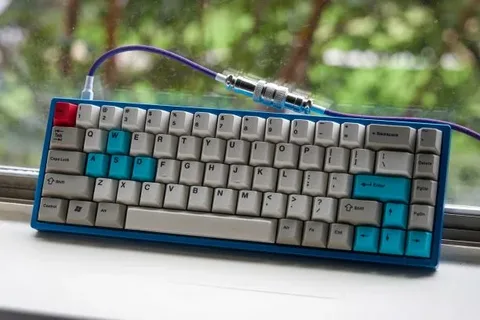
Mechanical keyboards have become increasingly popular among gamers, writers, and tech enthusiasts due to their tactile feel, durability, and customization options. Among these, small mechanical keyboards are gaining attention for their compact size and portability. If you’re new to this world, A Beginner’s Guide to Small Mechanical Keyboards and Layouts is the perfect place to start.
What Are Small Mechanical Keyboards?
Small mechanical keyboards refer to compact versions of full-sized mechanical keyboards. These typically come in layouts such as 60%, 65%, and 75%, reducing the number of keys by removing function rows, number pads, or even arrow keys, depending on the model.
Common Compact Layouts:
- 60% Layout: Removes function row, navigation cluster, and number pad. Ideal for minimalists.
- 65% Layout: Includes arrow keys and a few navigation buttons.
- 75% Layout: Keeps most of the essential keys in a tighter arrangement.
Each of these layouts has its own advantages, and choosing the right one depends on your specific needs.
Why Choose a Small Mechanical Keyboard?
There are several reasons why people are switching to small mechanical keyboards:
- Space Saving: Perfect for smaller desks or mobile setups.
- Ergonomics: Less distance to reach for the mouse.
- Aesthetic Appeal: Clean, modern look.
- Portability: Easier to carry for work or gaming on the go.
A Beginner’s Guide to Small Mechanical Keyboards and Layouts emphasizes the importance of finding the right balance between functionality and space-saving, which is crucial for comfort and efficiency.
Understanding Key Switches and Customization
Mechanical keyboards are known for their switches, which affect how keys feel and sound. Some common switch types include:
- Linear (e.g., Cherry MX Red) – Smooth with no tactile bump.
- Tactile (e.g., Cherry MX Brown) – Slight bump in the middle of the key press.
- Clicky (e.g., Cherry MX Blue) – Audible click with tactile feedback.
Most small mechanical keyboards support hot-swappable switches, allowing you to change switches without soldering. Additionally, many come with customizable keycaps, letting users personalize their keyboard appearance and feel.
Which Layout is Right for You?
When exploring A Beginner’s Guide to Small Mechanical Keyboards and Layouts, it’s essential to consider how you use your keyboard:
- For gaming: A 60% or 65% layout may suffice, offering more desk space for mouse movement.
- For programming or productivity: A 75% or even a compact TKL (tenkeyless) may be more practical.
- For travel or minimalist setups: A 60% layout is compact and highly portable.
Final Thoughts
A Beginner’s Guide to Small Mechanical Keyboard and Layouts aims to simplify your introduction to this exciting world. These compact keyboards offer a blend of style, efficiency, and customization that can enhance your typing or gaming experience. With the right layout and switch type, your keyboard can become more than just a tool—it can be a part of your everyday enjoyment.
